![superfy Logo-Neg-4.png]](https://knowledge.superfy.com/hs-fs/hubfs/superfy%20Logo-Neg-4.png?height=30&name=superfy%20Logo-Neg-4.png)
This article applies only to the 1NCE roaming SIM that Superfy provides with the Superfy Mini. If your device is using a different SIM or carrier plan, this country-by-country NB-IoT / Cat M1 breakdown does not apply — check coverage with that SIM provider instead.
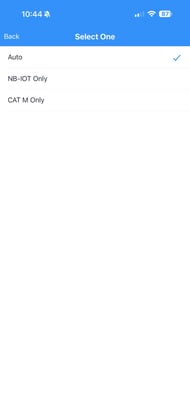
The Superfy Mini connects using either of two low-power cellular technologies: NB-IoT or Cat M1 (LTE-M). In the device's Network Type setting you can choose:
| Network Type | What it does |
| Auto (recommended) | The device automatically connects using whichever of NB-IoT or Cat M1 is available in that country. This gives the widest coverage with no manual switching. |
| Cat M1 only | Locks the device to Cat M1 (LTE-M) networks only. If a country has no Cat M1 roaming partner, the device will not connect at all, even if NB-IoT is available. |
| NB-IoT only | Locks the device to NB-IoT networks only. If a country has no NB-IoT roaming partner, the device will not connect at all, even if Cat M1 is available. |
Recommendation: leave your Superfy Mini's Network Type set to Auto unless you have a specific reason to lock it to one technology (for example, matching a fleet-wide configuration, or troubleshooting a connection issue). Auto picks up NB-IoT or Cat M1, whichever the local network partner supports, without you needing to know the country's coverage in advance.
How to set the Network Type on your Superfy Mini
- On the Device tab, tap the NFC scan button and hold your phone against the Superfy mini to read it.
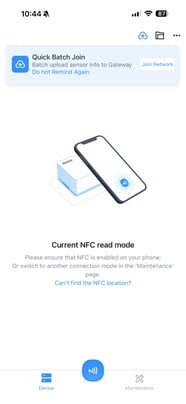
- Hold your phone against the device until the read finishes.
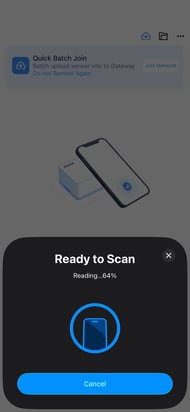
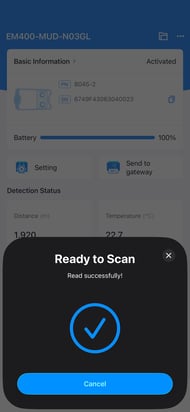
- On the device's detail page, tap Setting.
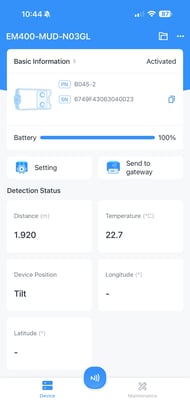
- Switch to the Network tab and tap the Network Type field (it shows the current value, e.g. Auto).
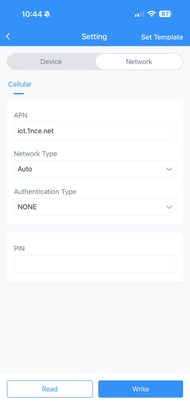
- Choose Auto, NB-IOT Only, or CAT M Only, then go back and tap Write to save it to the device.
When you might lock the Network Type manually
If you do need to force a specific type — say, for consistency across a fleet of devices, or because a network operator's Cat M1 and NB-IoT signals behave differently in a particular building or vehicle — use the lookup table below to check whether that technology is even available in the country the device will operate in. Locking to a technology that isn't supported there will leave the device with no connectivity, so it's worth checking first.
Quick reference: where each technology works
Full flexibility — both NB-IoT and Cat M1 available (21 countries)
In these countries, Auto, NB-IOT Only, and CAT M Only will all work, since a roaming partner supports each technology.
- Austria
- Belgium
- Czech Republic
- Denmark
- Estonia
- Finland
- France
- Germany
- Hungary
- Ireland
- Latvia
- Netherlands
- Norway
- Puerto Rico
- Spain
- Sweden
- Switzerland
- Taiwan
- US Virgin Islands
- USA
- Great Britain
NB-IoT only is available — CAT M Only will not connect (12 countries)
In these countries, use Auto or NB-IOT Only. Do not lock the device to CAT M Only here — there is no Cat M1 (LTE-M) roaming partner, so the device won't connect in that mode.
- Bulgaria
- China
- China (China+)
- Croatia
- Greece
- India
- Italy
- Malta
- Portugal
- Russia
- Slovak Republic
- Slovenia
Cat M1 only is available — NB-IOT Only will not connect (10 countries)
In these countries, use Auto or CAT M Only. Do not lock the device to NB-IOT Only here — there is no NB-IoT roaming partner, so the device won't connect in that mode.
- Australia
- Canada
- Guernsey
- Japan
- Jersey
- Luxembourg
- Mexico
- New Zealand
- Romania
- Korea, Republic of
Any country not listed in the table below: the Superfy Mini will not get a connection there in any Network Type (Auto included) since there is no NB-IoT or Cat M1 roaming partner in that country.
Full country reference table
Derived directly from the 1NCE Roaming Partner & Coverage List. "Yes" means at least one roaming partner in that country supports the technology.
| Country | NB-IoT Available | LTE-M (CAT-M1) Available |
|---|---|---|
| Australia | Yes | |
| Austria | Yes | Yes |
| Belgium | Yes | Yes |
| Bulgaria | Yes | |
| Canada | Yes | |
| China | Yes | |
| Croatia | Yes | |
| Czech Republic | Yes | Yes |
| Denmark | Yes | Yes |
| Estonia | Yes | Yes |
| Finland | Yes | Yes |
| France | Yes | Yes |
| Germany | Yes | Yes |
| Great Britain | Yes | Yes |
| Greece | Yes | |
| Guernsey | Yes | |
| Hungary | Yes | Yes |
| India | Yes | |
| Ireland | Yes | Yes |
| Italy | Yes | |
| Japan | Yes | |
| Jersey | Yes | |
| Korea, Republic of | Yes | |
| Latvia | Yes | Yes |
| Luxembourg | Yes | |
| Malta | Yes | |
| Mexico | Yes | |
| Netherlands | Yes | Yes |
| New Zealand | Yes | |
| Norway | Yes | Yes |
| Portugal | Yes | |
| Puerto Rico | Yes | Yes |
| Romania | Yes | |
| Russia | Yes | |
| Slovak Republic | Yes | |
| Slovenia | Yes | |
| Spain | Yes | Yes |
| Sweden | Yes | Yes |
| Switzerland | Yes | Yes |
| Taiwan | Yes | Yes |
| US Virgin Islands | Yes | Yes |
| USA | Yes | Yes |
If you have any questions or queries, contact support@superfy.com.