![superfy Logo-Neg-4.png]](https://knowledge.superfy.com/hs-fs/hubfs/superfy%20Logo-Neg-4.png?height=30&name=superfy%20Logo-Neg-4.png)
Understanding Container Subscription Types
Superfy supports three different container subscription types: Connected, Managed, and QR Code containers. Each subscription type offers different levels of monitoring, automation, and collection management.
It is important to note that these subscription types are not always mutually exclusive. For example, a container can be both Connected and QR Code enabled, allowing it to automatically report fill levels through a sensor while also accepting collection requests via a QR code.
 Connected Containers – Containers equipped with a Superfy sensor that automatically monitor and report fill levels in real time.
 Managed Containers – Containers without sensors that are monitored using configurable collection schedules.
 QR Code Containers – Containers that allow customers or members of the public to submit collection requests by scanning a QR code attached to the container.
Container Icon Colours and General Meaning
-
 Blue – Undeployed
A Blue container icon indicates that the container is currently marked as Undeployed, meaning it has not yet been delivered or installed at its physical location.
It is important to note that all newly created containers are automatically assigned an Undeployed status. As a result, the container icon will initially appear Blue on the map.
Once the container has been confirmed as deployed—either by a driver using the Superfy app or by an operator through the Superfy platform—the icon colour will automatically update to reflect its active status. Depending on the container subscription type and configuration, the colour may then be determined by:
- The current fill level (for sensor-enabled containers)
- The configured Collection Due Thresholds
- The status of an active collection request (for QR Code containers), such as Approved or Scheduled
A Blue icon simply indicates that the container has not yet been deployed and is not currently being monitored against any operational thresholds.
-
 Green – Empty / Mostly Empty
A Green container icon indicates that the container is either empty (typically following a recent collection) or mostly empty and operating within normal thresholds.
For sensor-enabled containers, the Green status is determined by the configured Container Fullness Level thresholds and indicates that the container has not yet reached the warning or collection-required levels.
For managed containers, a Green status means that the configured Collection Due Thresholds have not yet been reached and the container is not currently due for collection.
For QR Code containers, a Green status indicates that any collection request associated with the container has been fully completed and no further action is currently required.
In summary, a Green container indicates that the container is operating within its normal parameters and does not require immediate attention or collection.
-
 Orange – Partially Full / Attention Required
An Orange container icon indicates that the container is approaching a collection threshold and may require attention soon.
For sensor-enabled containers, the Orange status is determined by the configured Container Fullness Level Thresholds and typically indicates that the container is partially full and nearing its collection point.
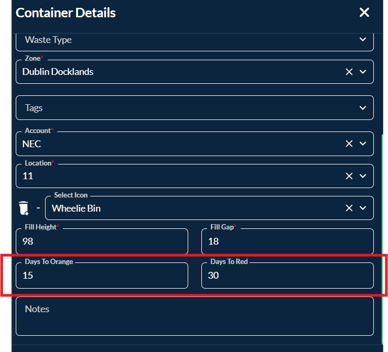
For managed containers, an Orange status means that the configured Days to Orange threshold has been reached, indicating that the container is approaching its scheduled collection date.
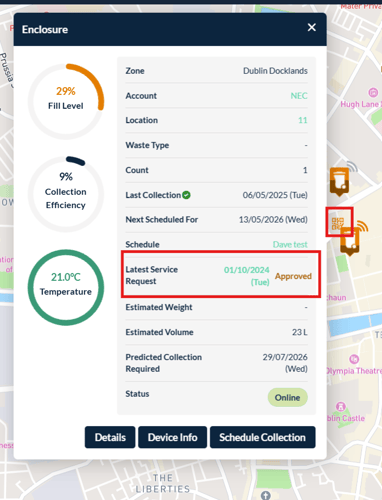
For QR Code containers, an Orange status indicates that a collection request has been submitted and subsequently Approved by an operator, but has not yet been scheduled for collection.
In summary, an Orange container serves as an early warning indicator that the container is approaching a condition where collection or servicing will soon be required.
-
A Red container icon indicates that the container has reached a critical threshold and requires collection or servicing.
 Red – Full / Collection Required
For sensor-enabled containers, the Red status is determined by the configured Container Fullness Level Thresholds and typically indicates that the container is full, nearly full, or overflowing and ready for collection.
For managed containers, a Red status means that the configured Days to Red threshold has been reached, indicating that the container is overdue or due for immediate collection based on its collection schedule.
For QR Code containers, a Red status indicates that a collection request has been Scheduled, meaning the request has been approved and assigned for collection.
It is important to note that Red represents the highest-priority container status. Once a container reaches Red status, it will remain Red until the underlying condition has been resolved, such as the container being collected, emptied, serviced, or its status otherwise reset.
In summary, a Red container indicates that immediate action is required and that the container should be prioritised for collection or servicing.
How Container Status Colours Are Determined
For Connected Containers, any changes made to the Container Fullness Level Thresholds will apply to all connected containers within your account.
However, a container's colour is not always determined solely by its fill level. Depending on the container configuration, multiple conditions may influence the displayed status colour, including:
- Container Fullness Level Thresholds (sensor-enabled containers)
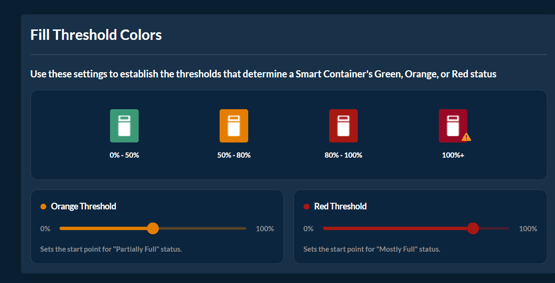
- Collection Due Days Thresholds (Days to Orange and Days to Red)
- QR Code Collection Request Statuses (Approved and Scheduled)
- Deployment Status (Undeployed)
Colour Priority Rules
The container icon colour is determined by the first threshold or condition that escalates the container to a higher-priority status.
For example:
| Condition | Resulting Colour |
|---|---|
| Container is undeployed | Blue |
| Fill level reaches Orange threshold | Orange |
| Fill level reaches Red threshold | Red |
| Days to Orange threshold reached | Orange |
| Days to Red threshold reached | Red |
| QR Collection Request Approved | Orange |
| QR Collection Request Scheduled | Red |
If multiple conditions apply to the same container, the platform will display the highest-priority colour that has been reached.
Example Scenarios
Example 1 – Fill Level Takes Precedence
A connected container reaches its Red fullness threshold and is marked Red.
A customer later submits a collection request, which is approved and subsequently scheduled.
The container will remain Red, as it has already reached the highest-priority status.
Example 2 – Collection Due Threshold Takes Precedence
A Connected container has not yet reached its fill level threshold, but its configured Days to Orange threshold is reached first.
The container will change to Orange, even if the fill level would otherwise indicate Green.
Example 3 – QR Request Takes Precedence
A QR Code collection request is submitted and approved for a container that is currently Green.
The container icon will change to Orange to indicate that an approved collection request exists.
If the request is later scheduled, the icon will change to Red.
Container Colour Changes Are Not Reversible
Container colours are designed to escalate as operational priority increases and are not automatically downgraded when another condition occurs later.
For example:
- A container that is already Red because it has exceeded its fullness threshold will remain Red if a collection request is later approved or scheduled.
- A container that is already Orange due to a collection due threshold will remain Orange until a higher-priority condition changes it to Red or the underlying condition is resolved.
In short, the container icon always reflects the highest-priority status currently affecting the container, ensuring that containers requiring attention remain clearly visible and prioritised for collection.