![superfy Logo-Neg-4.png]](https://knowledge.superfy.com/hs-fs/hubfs/superfy%20Logo-Neg-4.png?height=30&name=superfy%20Logo-Neg-4.png)
1. Full or Empty Bin
-
If the bin is in a busy area with frequent collections and high use, the distance readings may naturally fluctuate significantly over a 7-day period. This does not necessarily indicate a fault with the sensor but rather reflects genuine changes in the fill level.
Note: If you feel the reporting interval is too frequent for your use case, please be aware
that the recording interval of the Superfy Pro cannot be changed once it has been configured by the Superfy team. However, the recording interval of the Superfy Mini can be
adjusted using the Toolbox App. Please contact support@superfy.com for further
assistance.
2. Reflective Materials (Superfy Pro Only)
-
Certain waste types or objects with reflective surfaces can cause one or both lasers to
bounce unpredictably, producing large jumps in the distance readings.
Troubleshooting:
Check the current contents of the bin. If a reflective item is present, the reading may correct itself once the bin is emptied and refilled with normal waste. If the issue persists, it is likely caused by one of the other reasons listed in this article.
3. Obstructed Sensor
-
Dirt, debris, or waste material may be partially blocking the sensor, causing it to return inconsistent readings. Lightweight or puffy materials such as plastic bags can also catch the sensor at different heights on different readings, causing large jumps in the distance data.
Troubleshooting:
Superfy highly recommends regular cleaning of the sensor. Gently clean the optical lens or lenses with a clean cloth, no detergent required. Wipe over both the device and the bracket removing any dirt and grime from both surfaces. Do not spray cleaner directly onto the device. There is no need to remove the device from the container. Once cleaned, take a manual reading to verify that the sensor is now returning consistent readings.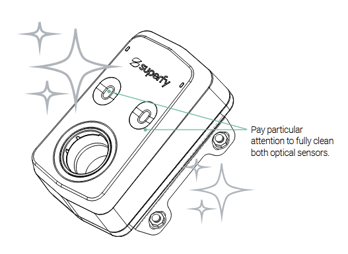
How to Take a Manual Reading:
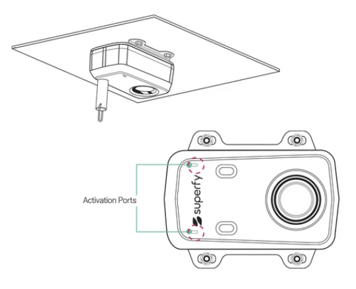
Superfy Pro: Hold a strong magnet at either of the activation ports until you hear 1 beep.
Remove the magnet and you will immediately hear an up-tone sound. After a few minutes,
you will hear a second up-tone sound, indicating that the data has been successfully sent
to the platform. You can now view the manual reading data via the Superfy Platform or App.
Superfy Mini: Using the Toolbox App, turn the device off and back on again. After a few
minutes, you will be able to view the updated reading via the Superfy Platform or App.
4. Condensation or Moisture
- Buildup of moisture on the sensor lens, particularly in outdoor or humid environments,
could cause the sensor to return erratic or inconsistent distance readings.
Troubleshooting:
Superfy highly recommends regular cleaning of the sensor. Gently clean the optical lens or lenses with a clean cloth, no detergent required. Wipe over both the device and the bracket removing any dirt and grime from both surfaces. Do not spray cleaner directly onto the device. There is no need to remove the device from the container. Once cleaned, take a manual reading to verify that the sensor is now returning consistent readings.
5. Physical Damage to the Sensor
- If one or both of the sensors have been physically damaged, they may return erratic or
inconsistent readings, causing large jumps in the distance data.
Troubleshooting:
Check that there is no obvious physical damage to the sensor. If you notice any physical damage, please contact support@superfy.com. They can provide more information and assist with the RMA process.
6. Environmental Causes
Harsh environmental conditions, particularly extreme temperatures, can affect the performance of the sensor and may cause erratic or inconsistent distance readings. If the sensor is deployed in an environment with particularly harsh conditions, this may be a contributing factor to noisy readings.