![superfy Logo-Neg-4.png]](https://knowledge.superfy.com/hs-fs/hubfs/superfy%20Logo-Neg-4.png?height=30&name=superfy%20Logo-Neg-4.png)
Note: This article is only relevant to the Superfy Pro sensor. If you are using a Superfy Mini, please refer to the relevant troubleshooting article for your device.
Important Note: If the two laser readings differ too significantly, the larger of the two
readings will be used to calculate the fill level.
1. Incorrect Sensor Installation
-
If the Superfy Pro sensor is not mounted correctly, with both optical lenses facing directly downwards towards the centre bottom of the container, this can result in unequal distance readings between the two lasers. This is especially likely when the waste inside the bin is not level.
Troubleshooting:
Ensure that both optical lenses are facing directly downwards towards the centre bottom of the container. If one lens is directed towards the side of the container or any other direction, this will result in inaccurate readings. For full installation guidance, please refer to the Superfy Pro Fill Level Sensor Installation Guide.
2. Obstructed Laser
-
Dirt, debris, or waste material may be blocking one of the lasers, preventing it from returning an accurate reading.
Troubleshooting:
Superfy highly recommends regular cleaning of the sensor. Gently clean the two optical lenses with a clean cloth, no detergent required. Wipe over both the device and the bracket removing any dirt and grime from both surfaces. Do not spray cleaner directly onto the device. There is no need to remove the device from the container.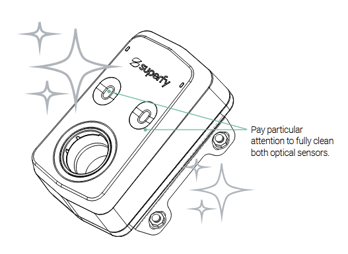
3. Reflective Materials
- Certain waste types or objects with reflective surfaces can cause one or both lasers to
bounce incorrectly, producing a false distance reading.
Troubleshooting:
Check the current contents of the bin. If a reflective item is present, the reading may correct itself once the bin is emptied and refilled with normal waste. If the issue persists, it is likely caused by one of the other reasons listed in this article.
4. Physical Damage to the Sensor
- If one or both of the lasers have been physically damaged, they may return inaccurate or
inconsistent readings compared to the other.
Troubleshooting:
Check that there is no obvious physical damage to the sensor. If you notice any physical damage, please contact support@superfy.com. They can provide more information and assist with the RMA process.
5. Condensation or Moisture
- Buildup of moisture on the laser lenses, particularly in outdoor or humid environments,
could interfere with one or both laser readings.
Troubleshooting:
Superfy highly recommends regular cleaning of the sensor. Gently clean the two optical lenses with a clean cloth, no detergent required. Wipe over both the device and the bracket removing any dirt and grime from both surfaces. Do not spray cleaner directly onto the device. There is no need to remove the device from the container.
6. Uneven Waste Surface
- If the waste inside the bin is piled unevenly or at a steep angle, the two lasers may naturally
return different readings. This does not necessarily indicate a fault with the sensor.