![superfy Logo-Neg-4.png]](https://knowledge.superfy.com/hs-fs/hubfs/superfy%20Logo-Neg-4.png?height=30&name=superfy%20Logo-Neg-4.png)
1. Weak NB-IoT Signal Coverage (RSSI/SNR)
- If the Superfy Pro or Superfy Mini is deployed in a weak signal area it can prevent the sensors from transmitting data reliably. A signal with an RSSI close to -110dBm or SNR less than -3dBm is likely to result in lost packets.
-
- Good Signal Levels (Optimal) - Stable operation and high success rate for data transmission.
- RSSI: -30 dBm to -60 dBm.
- RSRP: > -100 dBm (closer to 0 is better, e.g., -90 dBm)
- RSRQ: ≥ -7 dB
- SNR (or SINR): > 5 dB to 10 dB+ (higher is better)
- Good Signal Levels (Optimal) - Stable operation and high success rate for data transmission.
-
-
Acceptable Signal Levels (Normal) - Service stability may be affected, but still potentially functional.
- RSSI: -85 dBm to -100 dBm
- RSRP: -100 dBm to -110 dBm
- RSRQ: -7 dB to -11 dB
- SNR: -3 dB to 5 dB
-
Poor Signal Levels (Potential Issues) - High probability of service failure or connection loss.
- RSSI: -120 dBm or lower
- RSRP: < -115 dBm
- RSRQ: < -20dB
- SNR: < -3 dB
-
- Higher RSSI (closer to 0 dBm) is better. An RSSI of -30 dBm is considered excellent, while -90 dBm is very weak.
- Higher SNR is better. An SNR above 20 dB is generally excellent, while values below 0 dB indicate the signal power is less than the noise power, which can lead to communication failures.
- In summary, if the RSSI is low, the device may be too far from the base station or has physical obstructions. If the RSSI is good but the SNR is poor, it suggests a noisy environment with high interference.
Troubleshooting:
There are various free apps such as Signal Measurement that can be downloaded on your phone to check the signal strength at the sensor’s location. Signal Boosters also provides other useful apps.
If the area has very poor connectivity, the sensor may need to be moved to a location with better signal.
Click Here for further Information on how to troubleshoot Connectivity Issue on the Superfy Pro.
- Noise Floor: If your RSSI is good (e.g., -90 dBm) but your SNR is low (e.g., -10 dB), the environment is "noisy," which can cause packet loss even if the signal is strong.
- Material Matters: If sensors are inside metal containers or underground, the signal will be heavily attenuated. You should aim for higher (less negative) RSSI values in these scenarios to compensate for the obstruction.
- Data Reliability: For reliable, long-term monitoring, aim to keep your SNR above 5 dB and your RSSI better than -115 dBm to ensure high packet delivery rates.
2. Low Battery Power:
-
As the battery nears exhaustion, the transmission power decreases which can lead to missing packets or data.
- Temperature Extremes: Operating outside the -30°C to 70°C range can affect battery performance.
Troubleshooting:
If you require new batteries for either the Superfy Pro or Superfy Mini, please reach out to Support@superfy.com. They will be able to assist with purchasing additional batteries.
- Superfy Pro: Below is a link on how to replace the batteries in a Superfy Pro sensor.
-
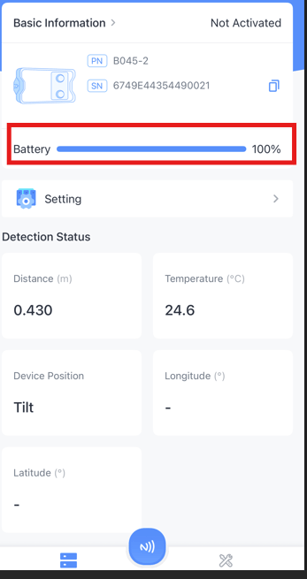
Superfy Mini: Use the Toolbox App to check the estimated remaining battery percentage.
-
Download the Toolbox App
-
Ensure that the NFC feature is enabled on your phone settings.
-
- Open the ToolBox App and place the Superfy Mini near your phone’s NFC area.
- Tap the NFC icon at the bottom of the Toolbox App screen to scan the device.
- Ensure the Superfy Mini is held steadily against the NFC area for a successful scan
- After the device has been successfully scanned, the estimated Battery fullness Information will appear on the main screen.
-
3. Damaged antenna:
-
Physical damage to antenna can lead to loss of data transmission issues.
Troubelshooting:
Check that there are no obivous pysical damage to the sensor.
If you notice any physical damage, please contact support@superfy.com. They can provide more information and assist with the RMA process.
4. Network and SIM Card Configuration Issues
Please note that the Superfy Pro and Superfy Mini use 1NCE SIMs and are configured to accept only 1NCE SIM cards.
If you choose to use your own SIM card or provider, these settings will not work. In this case, you must notify Superfy and provide the following information:
-
SIM card provider
-
APN settings
Please also note that the Superfy Pro firmware will need to be manually updated to support a different SIM card. To do this, Superfy will need to have the device in hand.
For more information about the Superfy Mini configuration, please see:
- Incorrect APN: The Access Point Name (APN) is not configured correctly for the specific mobile carrier, preventing the device from connecting.
- SIM/Data Plan Issues: The SIM card may have expired, reached its data limit, or has insufficient credit.
- Incorrect Pin Code: A required PIN code for the SIM card was not entered or was incorrect.
Troubleshooting:
Contact your SIM card provider to make sure none of the above issues apply and that all configurations have been set correctly.
5. Configuration and Operational Settings:
-
Both the Superfy Pro and Superfy Mini are configured to report every 6 hours by default. However, this setting can be changed on the Superfy Mini using the ToolBox app.
Troubleshooting:
If you notice an incorrect reporting interval, please check that this Setting has not been changed in the Superfy Mini ToolBox app.