![superfy Logo-Neg-4.png]](https://knowledge.superfy.com/hs-fs/hubfs/superfy%20Logo-Neg-4.png?height=30&name=superfy%20Logo-Neg-4.png)
When installing the sensor, always take a manual reading to ensure the fill level accurately reflects the bin’s contents. If the readings do not align, recheck the Fill Height and Fill Gap Measurements to ensure they have been entered correctly. Also, verify that the sensor is properly mounted, with both optical lenses positioned facing straight down toward the center bottom of the container. If either lens is angled toward the container’s side wall or any other direction, the sensor may capture false reflections or obstructed views, resulting in inaccurate readings.
Conducting a Manual Reading for the Superfy Pro Fill Level Sensor
- Hold a Strong Magnet at either of the activation ports highlighted in the below diagram until you hear 1 or 2 beeps.
- Remove the Magnet and you will immediately hear an up-tone sound.
- After a few minutes, you will hear a second up-tone sound, indicating that the data is now successfully being sent to the cloud.
- You can now view the manual reading data via the Superfy App.
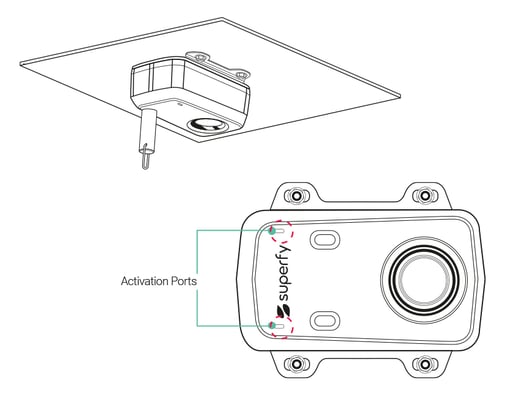
A strong magnet, such as a sturdy fridge magnet, can also be used to perform a Manual Reading.
Listen here:
Click Here to confirm that the sensor has successfully transmitted data to the platform and that the reading is accurate.