![superfy Logo-Neg-4.png]](https://knowledge.superfy.com/hs-fs/hubfs/superfy%20Logo-Neg-4.png?height=30&name=superfy%20Logo-Neg-4.png)
In this article
- When to use this check
- Before you start
- Stage A: Force a compaction
- Stage B: Inspect the fill level sensor
- Stage C: Check the wiring
- Record the result
When to use this check
Use this check when the fill level reading on the Superfy platform does not match the bin on site. For example, the Superfy platform shows the bin as full when the wheelie bin inside is empty or only part full.
Before you start
Download the S200 Incorrect Fill Level Check checklist (PDF) and fill it in as you go. It covers every step below and has space to record the result.
You will need:
- The service door key.
- A torch.
- Standard PPE (gloves and hi-vis).
- A phone or tablet logged in to the Superfy platform.
Check the fill level reading on the Superfy platform and note it before you touch the bin.
Safety: Keep your hands and tools out of the compaction chamber whenever the service door is closed or the bin is compacting.
Stage A: Force a compaction
- Remove the wheelie bin. Open the service door and take out the wheelie bin.
- Close the service door. With the wheelie bin removed, close the door. The bin should run a compaction cycle.
- Watch the LED. Note the LED colour during the cycle. It should turn green.
- Check the reading. When compaction has finished, check the fill level reading on the Superfy platform.
- If the reading has updated and is now correct, refit the wheelie bin, close the door and record the result. The check is complete.
- If it still reads full, go to Stage B.
Stage B: Inspect the fill level sensor
- Look at the sensor. With the wheelie bin still removed, open the service door and look up from inside the bin. You should be able to see the fill level sensor clearly.
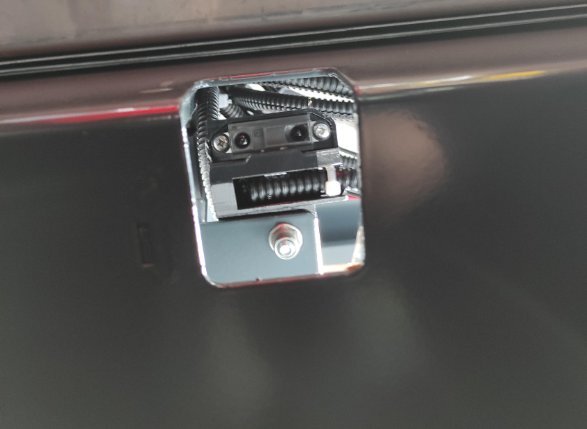
- Check for blockages. Look for anything blocking the sensor's view and note what you find.
- If debris is blocking the sensor, clear it, then repeat steps 2 to 4.
- If the sensor is clear and looks in order, go to Stage C.
Stage C: Check the wiring
- Check the sensor wiring. Follow the wiring from the fill level sensor back to the PCB. Look for loose, damaged or disconnected wires and connectors along the full length.
- Confirm the reading. Refit the wheelie bin, close the service door and check the fill level reading on the Superfy platform. If the bin still reads full after Stages A to C, record the result and raise it for follow-up.
Record the result
On the service report, record:
- The fill level reading before and after the check.
- The LED colour during compaction.
- Any debris you found.
- The condition of the sensor wiring.
- Whether the reading is now correct.
If you need help, contact support@superfy.com.